
Tech Featured
  • Home
  • Apple
  • Apps
  • Automobiles
  • Gadgets
  • Gaming
  • Reviews
  • Tech Tips
No Result
View All Result
  • Home
  • Apple
  • Apps
  • Automobiles
  • Gadgets
  • Gaming
  • Reviews
  • Tech Tips
No Result
View All Result
Tech Featured
No Result
View All Result
Home Tech Tips

How to use your Hand/Head to Control your Mouse

Oct 7, 2012
in Tech Tips
Reading Time: 1 min read
0

NPointer is an application for gestural computer control – hand movements are recorded by a webcam and translated into pointer movements. The application is also able to emulate the actions that are usually performed with a regular mouse or a touchpad: clicks, double-clicks, drags and scrolls. Also, disabled people may use head movements to control the computer.

It’s a gestural computer control software that records hand or head movements through a webcam, and translate them into mouse pointer movement. It’s an extremely handy tool for disabled folks who are unable to use a mouse. It also provides an on-screen menu to perform key actions, such as mouse clicks, double-click, scroll wheel or drag.
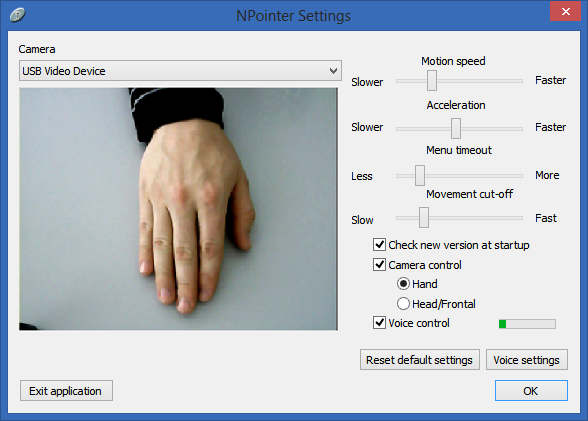
npointer settings

The application requires optimal webcam positioning for accurate cursor control, especially if you are aiming to use hand movements on a table surface. Make sure that the camera is pointed towards your hand, firmly mounted on a higher surface. The software itself resides in the system tray, keeps running in the background without intercepting your workflow. Its Settings console lets you adjust four different parameters before usage. For example, Motions speed refers to how fast the pointer moves in reaction to your hand. Likewise, you can also adjust the pointer’s Acceleration level. Menu timeout slider enables you to specify the idle time before the on screen action menu appears. Lastly, Movement cut-off allows you to adjust the frequency of ignoring those movements.

This software  works on Windows XP, Windows Vista, Windows 7 and Windows 8.

Download NPointer

Previous Post

Convert RSS Feeds & Articles To MP3 in WP using SoundGecko

Next Post

Get back Gadgets feature on Windows 8

techfeatured

techfeatured

Next Post

Get back Gadgets feature on Windows 8

For any queries, you can reach us at [email protected]

Latest Posts

  • iPhone Duo Wait Is Still 89 Days, but the 256GB Model Is Showing Up in Stores: How to Get One Sooner
  • The Best AI Agent Scores Just 12 Percent on SemiAnalysis New GDPx Test, and the Cheap Runner-Up Is the Real Story
  • Samsung AI Glasses Are Coming in December, but Only Two Countries Get Them First
  • Apple Beat Wall Street but Cannot Make Enough iPhone Duos: What Ternus Said, and What January Wait Times Mean for Buyers
  • DeepSeek Just Open-Sourced the Agent That Runs Its Own Coding Team: What dsh-superagent Actually Does
  • Guest Posts
  • Advertise
  • Contact Us
  • Privacy Policy

© 2026 JNews - Premium WordPress news & magazine theme by Jegtheme.

No Result
View All Result
  • Home
  • Apple
  • Apps
  • Automobiles
  • Gadgets
  • Gaming
  • Reviews
  • Tech Tips

© 2026 JNews - Premium WordPress news & magazine theme by Jegtheme.