Tech Featured
  • Home
  • Latest Tech
  • Apple
  • How to’s
  • Apps
  • Automobiles
  • Gadgets
  • Gaming
  • Reviews
  • Tech Tips
No Result
View All Result
  • Home
  • Latest Tech
  • Apple
  • How to’s
  • Apps
  • Automobiles
  • Gadgets
  • Gaming
  • Reviews
  • Tech Tips
No Result
View All Result
Tech Featured
No Result
View All Result
Home How to's

Howto: Easily get Cydia on Pangu 1.0.1 without re-jailbreaking

by techfeatured
Nov 8, 2014
in How to's, iPhone, Mobiles
0
Howto: Easily get Cydia on Pangu 1.0.1 without re-jailbreaking

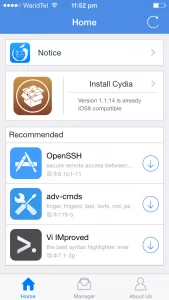
If you used an earlier version of Pangu that didn’t include Cydia as part of jailbreak process, you don’t need to re-jailbreak it. To install Cydia, simply run the Pangu app from your home screen.

  1. Tap on ‘Install Cydia’.

pangu-cydia

  1. Now tap on ‘Install’ found in top right corner of the screen to begin installing Cydia.
  2. After reboot/respring, you will have latest Cydia on your iOS device.

You might like to watch Detailed process to Jailbreak iOS 8 – 8.0.2

Previous Post

What is Xposed Framework For Android & best modules for Xposed framework

Next Post

Howto: Jailbreak iOS 8 – 8.0.2

Next Post
Howto: Jailbreak iOS 8 – 8.0.2

Howto: Jailbreak iOS 8 - 8.0.2

For any queries, you can reach us at [email protected]

Latest Posts

  • Modern Car Features for Everyday Drivers
  • Why Retail Stores Need Enterprise-Grade POS Technology
  • How AI is shaping the next generation of web development
  • The Power of Documentation: How Recording Pain Strengthens Your Case
  • “DeFi Is the New Global Economy”: An In-Depth Interview with Super CEO, Alexey Salashny
  • Guest Posts
  • Advertise
  • Contact Us
  • Privacy Policy

© 2026 JNews - Premium WordPress news & magazine theme by Jegtheme.

No Result
View All Result
  • Home
  • Latest Tech
  • Apple
  • How to’s
  • Apps
  • Automobiles
  • Gadgets
  • Gaming
  • Reviews
  • Tech Tips

© 2026 JNews - Premium WordPress news & magazine theme by Jegtheme.